
Consolidate users’ home directory in an external storage server and make it seamlessly accessible from every machine on the network.
NFS server#
Through the LDAP server we deployed previously we have achieved a centralised authentication management, to compliment that I think it’s pertinent that the /home directory is centralised too, in a way that every virtual machine has it as a mount-point directed to a file server located at tyule.pygrn.lab, instead of each box having a local directory for it separate from the other boxes.
There are many protocols and network filesystems that would help us create this type of centralised storage, in this chapter we’re going to be using NFS which is one of the more widespread services used to accomplish our objective.
One of the problem with NFS is that it doesn’t support TLS encryption (or any other form of encryption) natively. Anyone sniffing the network could grab the packets in-transit; a standard NFS connection looks like this:

But we’re going to get around that by creating a tunnel with stunnel through which the connection between the NFS client and the server will flow; it’ll be more like this:
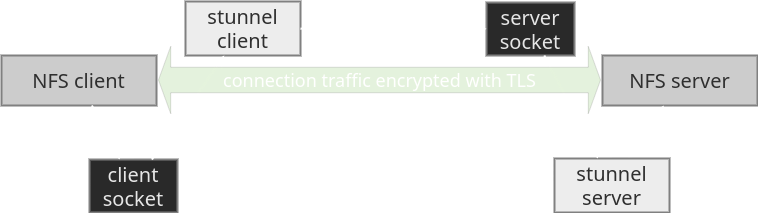
We will also encrypt the partition which will hold the filesystem that hosts the NFS export with luks to protect our users’ data at rest.
We won’t be using containers to deploy this, we’ll install the packages directly on the virtual machines because the idea is for every machine to share the same /home directory, so using containers would add an unnecesary layer of complexity which would barely grant any reproducible benefit.
We’re still going to use Ansible for the deployment though. We’ll also need to create a certificate with certstrap (or any tool you’ve been using to manage the CA) so go do that now and copy it to the files/CA directory; this time it needs to be in pem format and the private and public parts will be concatenated on the same file; so we only need: nfs.pem which will contain both sides of the key.
First create the keyfile that will be used to encrypt and decrypt the luks container.
$ dd if=/dev/urandom bs=32 count=1 of=files/nfs/luks_vdb_keyfileNow create an Ansible role called nfs and its task file.
$ cat roles/nfs/tasks/main.yml
---
- name: Install nfs server, stunnel and cryptsetup
  apt:
    name: "{{ item }}"
    state: "latest"
    update_cache: "yes"
  with_items:
    - "cryptsetup"
    - "nfs-kernel-server"
    - "stunnel"

- name: Copy luks_vdb_keyfile into /etc/
  copy:
    src: "nfs/luks_vdb_keyfile"
    dest: "/etc/"
    owner: "root"
    group: "root"
    mode: "0400"

- name: Encrypt /dev/vdb with luks and open the container
  luks_device:
    device: "/dev/vdb"
    state: "opened"
    keyfile: "/etc/luks_vdb_keyfile"
    name: "homecrypt"
    label: "homecrypt"

- name: Add /dev/mapper/homecrypt to crypttab
  crypttab:
    backing_device: "/dev/vdb"
    name: "/dev/mapper/homecrypt"
    password: "/etc/luks_vdb_keyfile"
    state: "present"

- name: Format /dev/mapper/homecrypt in ext4 if it's missing a filesystem
  filesystem:
    device: "/dev/mapper/homecrypt"
    fstype: "ext4"
    state: "present"

- name: Add /home mount entry to /etc/fstab
  mount:
    src: "/dev/mapper/homecrypt"
    path: "/home"
    fstype: "ext4"
    state: "mounted"

- name: Edit /etc/exports to include /home share through stunnel
  lineinfile:
    path: "/etc/exports"
    line: "/home 127.0.0.1(fsid=0,rw,sync,anonuid=0,anongid=0,no_subtree_check,insecure)"
    state: "present"
    owner: "root"
    group: "root"
    mode: "0644"
  register: "exportsf"

- name: Re-export nfs shares if /etc/exports file changes
  when: "exportsf.changed"
  command:
    cmd: "exportfs -a"

- name: Copy nfs pem key into /etc/ssl/pygrn.lab/
  copy:
    src: "CA/nfs.pem"
    dest: "/etc/ssl/pygrn.lab/"
    owner: "root"
    group: "ssl-cert"
    mode: "0660"

- name: Copy stunnel server file into /etc/stunnel/
  copy:
    src: "nfs/stunnel/server-nfs_tls.conf"
    dest: "/etc/stunnel/"
    owner: "root"
    group: "root"
    mode: "0644"

- name: Copy nfs server systemd socket into /etc/systemd/system/
  copy:
    src: "nfs/systemd/server-nfs_tls.socket"
    dest: "/etc/systemd/system/"
    owner: "root"
    group: "root"
    mode: "0644"

- name: Copy nfs server systemd service into /etc/systemd/system/
  copy:
    src: "nfs/systemd/server-nfs_tls@.service"
    dest: "/etc/systemd/system/"
    owner: "root"
    group: "root"
    mode: "0644"

- name: Set /var/empty/stunnel for stunnel chroot
  file:
    dest: "/var/empty/stunnel"
    owner: "root"
    group: "root"
    mode: "0755"
    state: "directory"

- name: Start stunnel systemd socket
  systemd:
    name: "server-nfs_tls.socket"
    state: "started"
That role copies the keyfile to the virtual machine acting as the NFS server which is tyule, encrypts /dev/vdb with luks, opens the encrypted drive, formats it with ext4 and mounts it at /home; as well as adds entries to /etc/crypttab and /etc/fstab in order to perform these tasks at each reboot.
The keyfile to unlock /dev/mapper/homecrypt will be located at /etc/luks_vdb_keyfile with 0400 ugo permissions, so only root will be able to read it.
It also sets up /home as an NFS export and puts in place stunnel’s configuration file and systemd socket unit. This is the server side of the NFS server.
Here are the server configuration files being copied to the virtual machines, create them with this content:
$ cat files/nfs/stunnel/server-nfs_tls.conf
# global
sslVersion      = TLSv1.3
TIMEOUTidle     = 600
renegotiation   = no
FIPS            = no
options         = NO_SSLv2
options         = NO_SSLv3
options         = SINGLE_DH_USE
options         = SINGLE_ECDH_USE
options         = CIPHER_SERVER_PREFERENCE
syslog          = yes
setuid          = nobody
setgid          = nogroup
chroot          = /var/empty/stunnel
libwrap         = yes
service         = server-nfs_tls
curve           = secp521r1
ciphers         = ECDH+AESGCM:DH+AESGCM:ECDH+AES256:DH+AES256:ECDH+AES128:DH+AES:RSA+AESGCM:RSA+AES:!aNULL:!MD5:!DSS

# credentials
verify          = 4
CAfile          = /etc/ssl/pygrn.lab/nfs.pem
cert            = /etc/ssl/pygrn.lab/nfs.pem

# role
connect         = 127.0.0.1:2049
$ cat files/nfs/systemd/server-nfs_tls.socket
[Unit]
Description=NFS over stunnel/TLS server

[Socket]
ListenStream=2363
Accept=yes
TimeoutSec=600

[Install]
WantedBy=sockets.target
$ cat files/nfs/systemd/server-nfs_tls@.service
[Unit]
Description=NFS over stunnel/TLS server

[Service]
ExecStart=/usr/bin/stunnel /etc/stunnel/server-nfs_tls.conf
StandardInput=socket
NFS Clients#
Now that we have tyule serving its /home directory through NFS let’s reconfigure every other virtual machine to mount that NFS export as their own /home directory. Create another Ansible role called nfs-client and its task file looking like this:
$ cat roles/nfs-client/tasks/main.yml
---
- name: Install nfs-common and stunnel
  when: "ansible_hostname != nfs_host_short"
  apt:
    name: "{{ item }}"
    state: "latest"
    update_cache: "yes"
  with_items:
    - "nfs-common"
    - "stunnel"

- name: Copy nfs pem key into /etc/ssl/pygrn.lab/
  when: "ansible_hostname != nfs_host_short"
  copy:
    src: "CA/nfs.pem"
    dest: "/etc/ssl/pygrn.lab/"
    owner: "root"
    group: "ssl-cert"
    mode: 0660

- name: Copy stunnel client file into /etc/stunnel/
  when: "ansible_hostname != nfs_host_short"
  copy:
    src: "nfs/stunnel/client-nfs_tls.conf"
    dest: "/etc/stunnel/"
    owner: "root"
    group: "root"
    mode: 0644

- name: Copy nfs client systemd socket into /etc/systemd/system/
  when: "ansible_hostname != nfs_host_short"
  copy:
    src: "nfs/systemd/client-nfs_tls.socket"
    dest: "/etc/systemd/system/"
    owner: "root"
    group: "root"
    mode: 0644

- name: Copy nfs client systemd service into /etc/systemd/system/
  when: "ansible_hostname != nfs_host_short"
  copy:
    src: "nfs/systemd/client-nfs_tls@.service"
    dest: "/etc/systemd/system/"
    owner: "root"
    group: "root"
    mode: 0644

- name: Set /var/empty/stunnel for stunnel chroot
  when: "ansible_hostname != nfs_host_short"
  file:
    dest: "/var/empty/stunnel"
    owner: "root"
    group: "root"
    mode: "0755"
    state: "directory"

- name: Start stunnel systemd socket
  when: "ansible_hostname != nfs_host_short"
  systemd:
    name: "client-nfs_tls.socket"
    state: "started"

- name: Add and mount /home entry into /etc/fstab pointing at stunnel
  when: "ansible_hostname != nfs_host_short"
  mount:
    src: "localhost:/"
    path: "/home"
    fstype: "nfs"
    state: "mounted"
    opts: "noauto,vers=4.2,proto=tcp,port=2323"
This role copies the client files used to mount the /home directory for every virtual machine except tyule, actually mounts the NFS export through stunnel and adds an entry to /etc/fstab.
You might wonder why on the last task the source for the NFS share is localhost:/ instead of tyule.pygrn.lab:/home and the reason is that we’re pointing the mount at our systemd socket which activates the rest of the connections steps to route the traffic through stunnel (see diagram above).
And these are the client configuration files:
$ cat files/nfs/stunnel/client-nfs_tls.conf
# global
sslVersion      = TLSv1.3
TIMEOUTidle     = 600
renegotiation   = no
FIPS            = no
options         = NO_SSLv2
options         = NO_SSLv3
options         = SINGLE_DH_USE
options         = SINGLE_ECDH_USE
options         = CIPHER_SERVER_PREFERENCE
syslog          = yes
setuid          = nobody
setgid          = nogroup
chroot          = /var/empty/stunnel
libwrap         = yes
service         = client-nfs_tls
curve           = secp521r1
ciphers         = ECDH+AESGCM:DH+AESGCM:ECDH+AES256:DH+AES256:ECDH+AES128:DH+AES:RSA+AESGCM:RSA+AES:!aNULL:!MD5:!DSS

# credentials
verify          = 4
CAfile          = /etc/ssl/pygrn.lab/nfs.pem
cert            = /etc/ssl/pygrn.lab/nfs.pem

# role
client          = yes
connect         = tyule.pygrn.lab:2363
$ cat files/nfs/systemd/client-nfs_tls.socket
[Unit]
Description=NFS over stunnel/TLS client

[Socket]
ListenStream=2323
Accept=yes
TimeoutSec=300

[Install]
WantedBy=sockets.target
$ cat files/nfs/systemd/client-nfs_tls@.service
[Unit]
Description=NFS over stunnel/TLS client

[Service]
ExecStart=/usr/bin/stunnel /etc/stunnel/client-nfs_tls.conf
StandardInput=socket
Running the playbook once more#
Review the playbook.yml, hosts, and group_vars/all.yml files:
$ cat playbook.yml
---
- name: "Preparation"
  hosts: all
  roles:
    - "global_preparation"

- name: "Syslog-ng Server"
  hosts: log
  gather_facts: "no"
  roles:
    - "syslog-ng"

- name: "OpenLDAP Server"
  hosts: ldap
  gather_facts: "no"
  roles:
    - "openldap"

- name: "OpenLDAP Clients"
  hosts: all
  gather_facts: "no"
  roles:
    - "openldap-client"

- name: "E-mail Server"
  hosts: email
  gather_facts: "no"
  roles:
    - "mail"

- name: "E-mail Clients"
  hosts: all
  gather_facts: "no"
  roles:
    - "mail-client"

- name: "NFS Server"
  hosts: nfs
  gather_facts: "no"
  roles:
    - "nfs"

- name: "NFS Clients"
  hosts: all
  gather_facts: "no"
  roles:
    - "nfs-client"
$ cat hosts
[log]
rumsi   ansible_host=192.168.122.8   ansible_ssh_user=root   ansible_ssh_private_key_file=[/path/to/ssh/key]

[ldap]
doris   ansible_host=192.168.122.2   ansible_ssh_user=root   ansible_ssh_private_key_file=[/path/to/ssh/key]
cutxn   ansible_host=192.168.122.3   ansible_ssh_user=root   ansible_ssh_private_key_file=[/path/to/ssh/key]
cutxo   ansible_host=192.168.122.4   ansible_ssh_user=root   ansible_ssh_private_key_file=[/path/to/ssh/key]

[email]
doris   ansible_host=192.168.122.2   ansible_ssh_user=root   ansible_ssh_private_key_file=[/path/to/ssh/key]
watts   ansible_host=192.168.122.9   ansible_ssh_user=root   ansible_ssh_private_key_file=[/path/to/ssh/key]

[nfs]
tyule   ansible_host=192.168.122.7   ansible_ssh_user=root   ansible_ssh_private_key_file=[/path/to/ssh/key]

[undefined]
boldh   ansible_host=192.168.122.5   ansible_ssh_user=root   ansible_ssh_private_key_file=[/path/to/ssh/key]
grees   ansible_host=192.168.122.6   ansible_ssh_user=root   ansible_ssh_private_key_file=[/path/to/ssh/key]
$ cat group_vars/all.yml
# nfs
nfs_host: "tyule.pygrn.lab"
nfs_host_short: "tyule"

# mail
mail_host: "watts.pygrn.lab"
mail_host_short: "watts"
mail_webui_host: "doris.pygrn.lab"
mail_webui_host_short: "doris"

# openldap
ldap_host1: "cutxn.pygrn.lab"
ldap_host1_short: "cutxn"
ldap_host2: "cutxo.pygrn.lab"
ldap_host2_short: "cutxo"
ldap_webui_host: "doris.pygrn.lab"
ldap_webui_host_short: "doris"

ldap_tw1zr_mail: "tw1zr@pygrn.lab"
ldap_guest1_mail: "guest2@pygrn.lab"
ldap_guest2_mail: "guest2@pygrn.lab"

ldap_tw1zr_pass: "fu9F4yzKH3"
ldap_guest1_pass: "Ln9CQMsDZA"
ldap_guest2_pass: "bKwDKP6z57"

ldap_admin_pass: "2hJmj7TFrz"
ldap_config_pass: "bTu5njqLLd"
ldap_readonly_pass: "Drq8nNEG6C"

# logs
syslog_ng_host: "rumsi.pygrn.lab"
syslog_ng_host_short: "rumsi"
Run the playbook again after adjusting those files and that’s it. To test it we can create a test file inside the /home directory of one machine and see if it’s replicated in the others.