
Manage global and centralized user accounts for multiple machines and services.
Quick ping check with Ansible ad-hoc command#
Let’s run a ping test with Ansible to make sure all our VMs are running fine first:
$ ansible all -m ping
cutxo | SUCCESS => {
    "ansible_facts": {
        "discovered_interpreter_python": "/usr/bin/python3"
    },
    "changed": false,
    "ping": "pong"
}
doris | SUCCESS => {
    "ansible_facts": {
        "discovered_interpreter_python": "/usr/bin/python3"
    },
    "changed": false,
    "ping": "pong"
}
cutxn | SUCCESS => {
    "ansible_facts": {
        "discovered_interpreter_python": "/usr/bin/python3"
    },
    "changed": false,
    "ping": "pong"
}
Note the "ping": "pong" response on every one of our virtual machines, this means they are up and Ansible is able to communicate with them.
Configuration of LDAP server container#
To run our LDAP server we will use a master/master configuration of OpenLDAP on the cutxn and cutxo virtual machines. We’ll use Ansible to deploy it so we need to set up the tasks on the openldap role we made in the previous chapter.
Modify the content of /path/to/ansible/roles/openldap/tasks/main.yml by appending these lines:
Lines to append to roles/openldap/tasks/main.yml
- name: Set /srv/openldap permissions
  when: "ansible_hostname == 'cutxn' or ansible_hostname == 'cutxo'"
  file:
    dest: "/srv/openldap"
    owner: "root"
    group: "root"
    mode: "0755"
    state: "directory"

- name: Set /srv/openldap/ldap permissions
  when: "ansible_hostname == 'cutxn' or ansible_hostname == 'cutxo'"
  file:
    dest: "/srv/openldap/ldap"
    owner: "911"
    group: "911"
    mode: "0755"
    state: "directory"

- name: Set /srv/openldap/slapd.d permissions
  when: "ansible_hostname == 'cutxn' or ansible_hostname == 'cutxo'"
  file:
    dest: "/srv/openldap/slapd.d"
    owner: "911"
    group: "911"
    mode: "0755"
    state: "directory"

- name: Copy openldap ldifs into /srv/openldap/
  when: "ansible_hostname == 'cutxn' or ansible_hostname == 'cutxo'"
  copy:
    src: "openldap/ldifs"
    dest: "/srv/openldap/"
    owner: "911"
    group: "911"

- name: Set /srv/openldap/certs permissions
  when: "ansible_hostname == 'cutxn' or ansible_hostname == 'cutxo'"
  file:
    dest: "/srv/openldap/certs"
    owner: "911"
    group: "911"
    mode: "0755"
    state: "directory"

- name: Copy pygrn.lab-CA.crt into /srv/openldap/certs/
  when: "ansible_hostname == 'cutxn' or ansible_hostname == 'cutxo'"
  copy:
    src: "CA/pygrn.lab-CA.crt"
    dest: "/srv/openldap/certs/"
    owner: "911"
    group: "911"
    mode: "0600"

- name: Copy openldap.crt into /srv/openldap/certs/
  when: "ansible_hostname == 'cutxn' or ansible_hostname == 'cutxo'"
  copy:
    src: "CA/openldap.crt"
    dest: "/srv/openldap/certs/"
    owner: "911"
    group: "911"
    mode: "0600"

- name: Copy openldap.key into /srv/openldap/certs/
  when: "ansible_hostname == 'cutxn' or ansible_hostname == 'cutxo'"
  copy:
    src: "CA/openldap.key"
    dest: "/srv/openldap/certs/"
    owner: "911"
    group: "911"
    mode: "0600"

- name: OpenLDAP container
  when: "ansible_hostname == 'cutxn' or ansible_hostname == 'cutxo'"
  docker_container:
    name: '{{ ansible\_hostname }}-openldap'
    restart\_policy: "always"
    image: 'osixia/openldap:latest'
    hostname: '{{ ansible\_hostname }}.pygrn.lab'
    published\_ports:
      - "389:389"
    env:
      LDAP_BASE_DN: "dc=pygrn,dc=lab"
      LDAP_ORGANISATION: "Pygrn Lab"
      LDAP_DOMAIN: "pygrn.lab"
      LDAP_ADMIN_PASSWORD: "nyaa"
      LDAP_CONFIG_PASSWORD: "nyaa"
      LDAP_READONLY_USER: "true"
      LDAP_READONLY_USER_USERNAME: "readonly"
      LDAP_READONLY_USER_PASSWORD: "aayn"
      LDAP_TLS: "true"
      LDAP_TLS_VERIFY_CLIENT: "try"
      LDAP_TLS_CA\_CRT_FILENAME: "pygrn.lab-CA.crt"
      LDAP_TLS_CRT_FILENAME: "openldap.crt"
      LDAP_TLS_KEY_FILENAME: "openldap.key"
      LDAP_REPLICATION: "true"
      LDAP_REPLICATION_HOSTS: "#PYTHON2BASH:['ldap://cutxn.pygrn.lab','ldap://cutxo.pygrn.lab']"
    volumes:
      - "/etc/timezone:/etc/timezone:ro"
      - "/etc/localtime:/etc/localtime:ro"
      - "/srv/openldap/ldap:/var/lib/ldap"
      - "/srv/openldap/slapd.d:/etc/ldap/slapd.d"
      - "/srv/openldap/certs:/container/service/slapd/assets/certs"
The first few tasks create /srv/openldap and some sub-directories, set their permissions, then copy certificate files and two ldif files (auth_and_tls.ldif and groups_and_users.ldif—content of these below) into them to modify the LDAP server.
The last task defines the openldap container.
The image I’m using is docker-openldap, there is decent documentation on their page.
Most of the environment variables defined in this container are very similar to the ones defined in the php we made previously. We define some LDAP parameters, credentials, certificates and the DNS address (made resolvable by the local zone we did in Part 2) of the two hosts serving as master/master.
This container will get deployed to both cutxn and cutxo since we’re using this conditional when: "ansible_hostname == 'cutxn' or ansible_hostname == 'cutxo'" just like in the previous container, only this time it specifies two hostnames and will get deployed to both.
Here’s the output of using cat on the ldif files:
$ cat files/openldap/ldifs/auth_and_tls.ldif
# disallow anonymous bind
dn: cn=config
changetype: modify
add: olcDisallows
olcDisallows: bind_anon

# require authentication
dn: olcDatabase={-1}frontend,cn=config
changetype: modify
add: olcRequires
olcRequires: authc

# require tls
dn: cn=config
changetype:  modify
add: olcSecurity
olcSecurity: tls=1
$ cat files/openldap/ldifs/groups_and_users.ldif
# 'Groups' organizational unit
dn: ou=Groups,dc=pygrn,dc=lab
objectclass: organizationalUnit
objectclass: top
ou: Groups

# 'wheel' posix group
dn: cn=wheel,ou=Groups,dc=pygrn,dc=lab
cn: wheel
gidnumber: 1250
objectclass: posixGroup
objectclass: top

# 'guests' posix group
dn: cn=guests,ou=Groups,dc=pygrn,dc=lab
cn: guests
gidnumber: 1260
objectclass: posixGroup
objectclass: top

# 'Users' organizational unit
dn: ou=Users,dc=pygrn,dc=lab
objectclass: organizationalUnit
objectclass: top
ou: Users

# 'tw1zr' posix account, member of 'wheel'
dn: cn=tw1zr,ou=Users,dc=pygrn,dc=lab
cn: tw1zr
gidnumber: 1250
givenname: tw1zr
homedirectory: /home/tw1zr
loginshell: /bin/bash
objectclass: inetOrgPerson
objectclass: posixAccount
objectclass: top
sn: tw1zr
uid: tw1zr
uidnumber: 1250
userpassword: {MD5}L2vYPpPFMwps3sz3Q0b90A==

# 'guest1' posix account, member of 'guests'
dn: cn=guest1,ou=Users,dc=pygrn,dc=lab
cn: guest1
gidnumber: 1260
givenname: guest1
homedirectory: /home/guest1
loginshell: /bin/bash
objectclass: inetOrgPerson
objectclass: posixAccount
objectclass: top
sn: guest1
uid: guest1
uidnumber: 1261
userpassword: {MD5}vQ3rQ4oyWpcZcFD5w7dldw==

# 'guest2' posix account, member of 'guests'
dn: cn=guest2,ou=Users,dc=pygrn,dc=lab
cn: guest2
gidnumber: 1260
givenname: guest2
homedirectory: /home/guest2
loginshell: /bin/bash
objectclass: inetOrgPerson
objectclass: posixAccount
objectclass: top
sn: guest2
uid: guest2
uidnumber: 1262
userpassword: {MD5}ZqXA290kYZ/F6XnHj6RpRw==
Configuring LDAP client role#
We’re also going to create an independant role which will configure our virtual machines to act as clients of the LDAP server. This will make it so that the users and groups we create on LDAP are available on Linux as if they were natively created on the machines.
Create /path/to/ansible/roles/openldap-client/tasks/main.yml to look like this:
$ cat roles/openldap-client/tasks/main.yml
---
- name: Install Linux dependencies for connecting to LDAP server
  apt:
    name: "{{ item }}"
    state: "latest"
    update_cache: "yes"
  with_items:
    - "ldap-utils"
    - "libnss-ldap"
    - "libpam-ldap"
    - "nscd"

- name: Copy openldap.crt into /etc/ssl/pygrn.lab/
  copy:
    src: "CA/openldap.crt"
    dest: "/etc/ssl/pygrn.lab/"
    owner: "root"
    group: "ssl-cert"
    mode: "0664"

- name: Copy openldap.key into /etc/ssl/pygrn.lab/
  copy:
    src: "CA/openldap.key"
    dest: "/etc/ssl/pygrn.lab/"
    owner: "root"
    group: "ssl-cert"
    mode: "0660"

- name: Add nsswitch.conf to /etc/
  copy:
    src: "nsswitch.conf"
    dest: "/etc/"
    owner: "root"
    group: "root"
    mode: "0644"
  register: "add_nsswitch_result"

- name: Add common-session to /etc/pam.d/
  copy:
    src: "common-session"
    dest: "/etc/pam.d/"
    owner: "root"
    group: "root"
    mode: "0644"

- name: Add pam_ldap.conf to /etc/
  copy:
    src: "pam_ldap.conf"
    dest: "/etc/"
    owner: "root"
    group: "root"
    mode: "0644"

- name: Add libnss-ldap.conf to /etc/
  copy:
    src: "libnss-ldap.conf"
    dest: "/etc/"
    owner: "root"
    group: "root"
    mode: "0644"

- name: Add pam_ldap.secret to /etc/
  copy:
    src: "pam_ldap.secret"
    dest: "/etc/"
    owner: "root"
    group: "root"
    mode: "0600"

- name: Add libnss-ldap.secret to /etc/
  copy:
    src: "libnss-ldap.secret"
    dest: "/etc/"
    owner: "root"
    group: "root"
    mode: "0600"

- name: Restart nscd if nsswitch.conf is changed
  when: "add_nsswitch_result.changed"
  systemd:
    name: "nscd"
    state: "restarted"
Now here are the contents of these files which are being copied by the openldap-client role, I’ll cat them and drop the output. They all go inside the /path/to/ansible/files/ directory so Ansible can access them and copy them over to our virtual machines when the playbook is executed.
$ cat files/nsswitch.conf
passwd:         files ldap
group:          files ldap
shadow:         files ldap
gshadow:        files

hosts:          files dns
networks:       files

protocols:      db files
services:       db files
ethers:         db files
rpc:            db files

netgroup:       nis
$ cat files/common-session
session [default=1]   pam_permit.so
session requisite     pam_deny.so
session required      pam_permit.so
session required      pam_unix.so
session optional      pam_systemd.so
session required      pam_mkhomedir.so skel=/etc/skel umask=077
$ cat files/pam_ldap.conf
base dc=pygrn,dc=lab
uri ldap://cutxn.pygrn.lab ldap://cutxo.pygrn.lab
ldap_version 3
binddn cn=readonly,dc=pygrn,dc=lab
bindpw aayn
rootbinddn cn=admin,dc=pygrn,dc=lab
port 389

pam_password crypt

ssl start_tls
tls_checkpeer yes
tls_cacertfile /etc/ssl/pygrn.lab/pygrn.lab-CA.crt
tls_cert /etc/ssl/pygrn.lab/openldap.crt
tls_key /etc/ssl/pygrn.lab/openldap.key
$ cat files/libnss-ldap.conf
base dc=pygrn,dc=lab
uri ldap://cutxn.pygrn.lab ldap://cutxo.pygrn.lab
ldap_version 3
binddn cn=readonly,dc=pygrn,dc=lab
bindpw aayn
rootbinddn cn=admin,dc=pygrn,dc=lab
port 389

ssl start_tls
tls_checkpeer yes
tls_cacertfile /etc/ssl/pygrn.lab/pygrn.lab-CA.crt
tls_cert /etc/ssl/pygrn.lab/openldap.crt
tls_key /etc/ssl/pygrn.lab/openldap.key
The pam_ldap.secret and libnss-pam.secret files both just hold the rootdn password of the LDAP server. This is useful to make root on every box behave like cn=admin. I’ll simply use ‘nyaa’ as password because this is a test environment.
$ echo -n 'nyaa' | tee pam_ldap.secret > libnss-ldap.secretThe openldap.crt and openldap.key files are the certificate and key we created so we could use TLS with OpenLDAP.
Before running the playbook again, let’s create the global_finalizing role. For now this role will only make sure some systemd services are enabled and running on the virtual machines.
Finalization role#
This doesn’t mean we won’t create any more roles by the way, not even close. I just like to have a role that runs before all the others and a role that runs after. Helps me with organization.
Create roles/global_finalizing/tasks/main.yml with these lines:
---
- name: Make sure some services are started and enabled
  systemd:
    name: "{{ item }}"
    state: "started"
    enabled: "yes"
  with_items:
    - "docker"
    - "nscd"
    - "sshd"
Running the playbook after the new changes#
Let’s make sure our playbook.yml file looks like this:
$ cat playbook.yml
---
- name: "Preparation"
  hosts: all
  roles:
    - "global_preparation"

- name: "OpenLDAP Server"
  hosts: ldap
  gather_facts: "no"
  roles:
    - "openldap"

- name: "OpenLDAP Clients"
  hosts: all
  gather_facts: "no"
  roles:
    - "openldap-client"

- name: "Finilizing"
  hosts: all
  gather_facts: "no"
  roles:
    - "global_finalizing"
Now run the playbook again, once finished we will have a pair of LDAP servers in two different VMs with master/master replication.
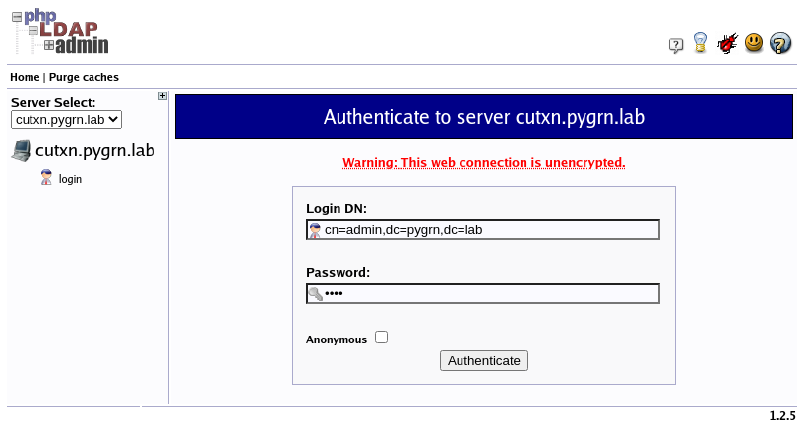
When the playbook finishes running we’ll try to connect to the LDAP server with the phpLDAPadmin front-end we deployed earlier.
Recreate the ssh tunnel to access the virtual machine on port 6080:
$ ssh -L 6080:192.168.122.2:6080 root@[IP of hypervisor] -NOpen a web browser and go to localhost:6080. When the page loads try to login into the LDAP server with the credentials we defined for the Docker container.
Modifying the LDAP server#
We could do whatever modification we wanted through the PHP front-end, but we’re going to use the command line to apply the ldif files we copied into the machines with Ansible in the earlier role.
Log into cutxn through ssh and apply the first ldif file with this command:
ldapmodify -ZZ -H ldap://cutxn.pygrn.lab -D cn=admin,cn=config -w nyaa -f /srv/openldap/ldifs/auth_and_tls.ldifThe auth_and_tls.ldif file modifies the cn=config so that anonymous binds are not allowed and explicit authentication is required instead. If you look at the Ansible task where we defined credentials for LDAP there is a read-only account which will be used to query the directory structure and retrieve users/groups. It also disallows any connection which isn’t using TLS. Now apply the second ldif with this command:
ldapadd -ZZ -H ldap://cutxn.pygrn.lab -D cn=admin,dc=pygrn,dc=lab -w nyaa -f /srv/openldap/ldifs/groups_and_users.ldifThe groups_and_users.ldif file adds two organizational units (OU): Groups and Users; then adds two posix groups under ou=Groups: wheel and guests; and three posix users under ou=Users: tw1zr, guest1 and guest2. Here’s a diagram depicting it:
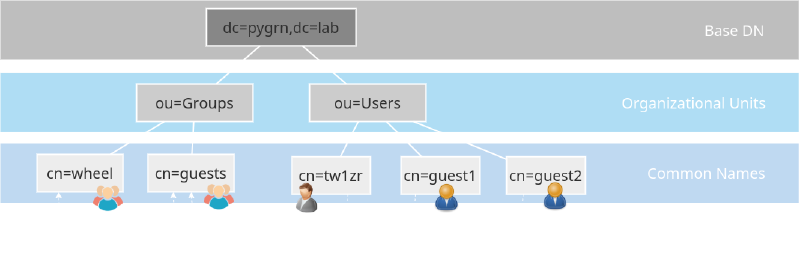
The dotted lines at the bottom denote which posix users belong to which posix groups, this is accomplished by setting the users’ GID number to the same as the group you want them to belong to (re-read the ldif file).
Let’s do an ldapsearch to check our changes were applied correctly; we’ll also do the search pointing at cutxo instead of cutxn to check that replication is working:
The following command queries the cn=config and uses grep to filter the output so it only displays the olc parameters to do with anonymous binds, TLS requirement and authentication requirement:
$ ldapsearch -ZZ -H ldap://cutxo.pygrn.lab -D cn=admin,cn=config -w nyaa -b cn=config | grep 'olcDisallows:\|olcSecurity:\|olcRequires:'
olcDisallows: bind_anon
olcSecurity: tls=1
olcRequires: authc
Now I’ll run another ldapsearch to query the entire DN:
$ ldapsearch -ZZ -H ldap://cutxo.pygrn.lab -D cn=admin,dc=pygrn,dc=lab -w nyaa -b dc=pygrn,dc=labThe output of that command shows the extended ldif of the entire DN. We can also check this through that phpLDAPadmin front-end we deployed.

Let’s log into the three VMs through ssh using the three different users we created on the LDAP server. We added passwords encoded in MD5 in the groups_and_users.ldif file, I’ll type them here now in plain text so we can use them to ssh into the boxes:
root:nyaa tw1zr:nyaa guest1:yugi guest2:yigo
Authenticating as tw1zr:
Authenticating as guest1:
Authenticating as guest2:
None of these accounts were created on the Linux machines, Linux is just querying the LDAP server and allowing the posix accounts there to access the machine as if they were local, this is what our configuration files are accomplishing.
I also ran sudo -l as tw1zr to make sure our sudo privileges were working properly; we defined all the users in the wheel group to be able to run sudo commands without a password.
Many services out there are designed to be compatible with LDAP authentication. We will likely use it again when we deploy further services.